BibiGPT (also known as AI 课代表, at bibigpt.co and aitodo.co) is one of the most popular AI video summarizers in the Chinese-speaking world. It began in 2023 as an open-source project for summarising Bilibili videos and has grown into a paid service covering more than 30 platforms: Bilibili, YouTube, TikTok and Douyin, podcasts, online courses and your own files.
Skryve is built for learning from YouTube and Rumble videos. It reads what's said and what's shown, keeps the summary next to the video in Chrome's side panel, and saves every video to a library you can search and ask questions across.
Both are serious tools. They're built around different habits: BibiGPT around pasting links into its app, Skryve around the video you're already watching. Here's an honest comparison.
What is BibiGPT?
You paste a link, or upload a file, into BibiGPT's web app, desktop app or phone app. It fetches the subtitles, or transcribes the audio itself, and returns a timestamped summary, a transcript, a mind map and a chat about the video. It can also turn a video into an article, slides, flashcards or social posts.
By default, summaries are built from the subtitles or the transcript. BibiGPT also offers a separate visual analysis: it picks around ten slide-like keyframes and sends them to a vision model. That's an extra step that costs credits each time, and its pricing lists visual analysis on the Pro plan. Its own docs note that videos of people talking produce few keyframes.
Its Chrome extension, now called AI Watch Later, saves videos to a watch-later list that syncs with the app. A Collections feature lets you summarise and chat across a playlist or a group of videos.
What is Skryve?
Skryve is an AI video summarizer and personal knowledge base for YouTube and Rumble. It opens in Chrome's side panel, next to the video, and everything happens there.
It reads the transcript and samples the video's frames in every summary, so charts, slides, code, products and demos shown on screen appear in the summary with the frame attached. Every point links to its moment in the video. The summary takes a layout that fits the type of video (a review becomes a verdict with pros and cons, a recipe becomes steps, a ranking becomes a table), and Skryve picks out the key clips and analyses the comments.
Every video you summarise is saved to your library automatically. You can search it, ask questions across all your videos, or draft a post from them, with the source videos cited, without leaving the side panel.
Skryve vs BibiGPT: feature comparison
| Feature | Skryve | BibiGPT |
|---|---|---|
| YouTube | Yes | Yes |
| Rumble | Yes | Not listed |
| Bilibili, TikTok, podcasts, courses, your own files | Not yet (web pages, PDFs and TikTok are on the roadmap) | Yes, 30+ platforms |
| Videos without captions | No | Yes (transcribes the audio) |
| Frames from the video in the summary | In every summary | Separate visual analysis, about 10 keyframes, costs credits |
| Clickable timestamps | Yes | Yes |
| Where you use it | Chrome's side panel, next to the video | Web, desktop and phone apps; you paste a link |
| Layout that fits the type of video | Yes | No (same summary format, plus mind map) |
| Key moments picked as playable clips | Yes | No |
| Comment sentiment analysis | Yes | No |
| Chat with a video | Yes | Yes |
| Ask across many videos | Your whole library, automatically | Collections or playlists you set up |
| Mind maps, flashcards, slides | No | Yes |
| Export | Markdown, Word, HTML, PDF | Markdown, JSON, subtitle files, Notion |
| Free plan | 200 free credits to start | 120 minutes on sign-up (up to 3 videos of 30 minutes) |
| Paid plan | Pro, $8 a month | Plus $19.80 a month (videos up to 2 hours); Pro $34.80 a month (up to 6 hours) |
Built-in features as of November 2026, from BibiGPT's pricing page, documentation and extension listing.
1. We tried both on the same videos
We ran BibiGPT and Skryve on the same videos in November 2026.
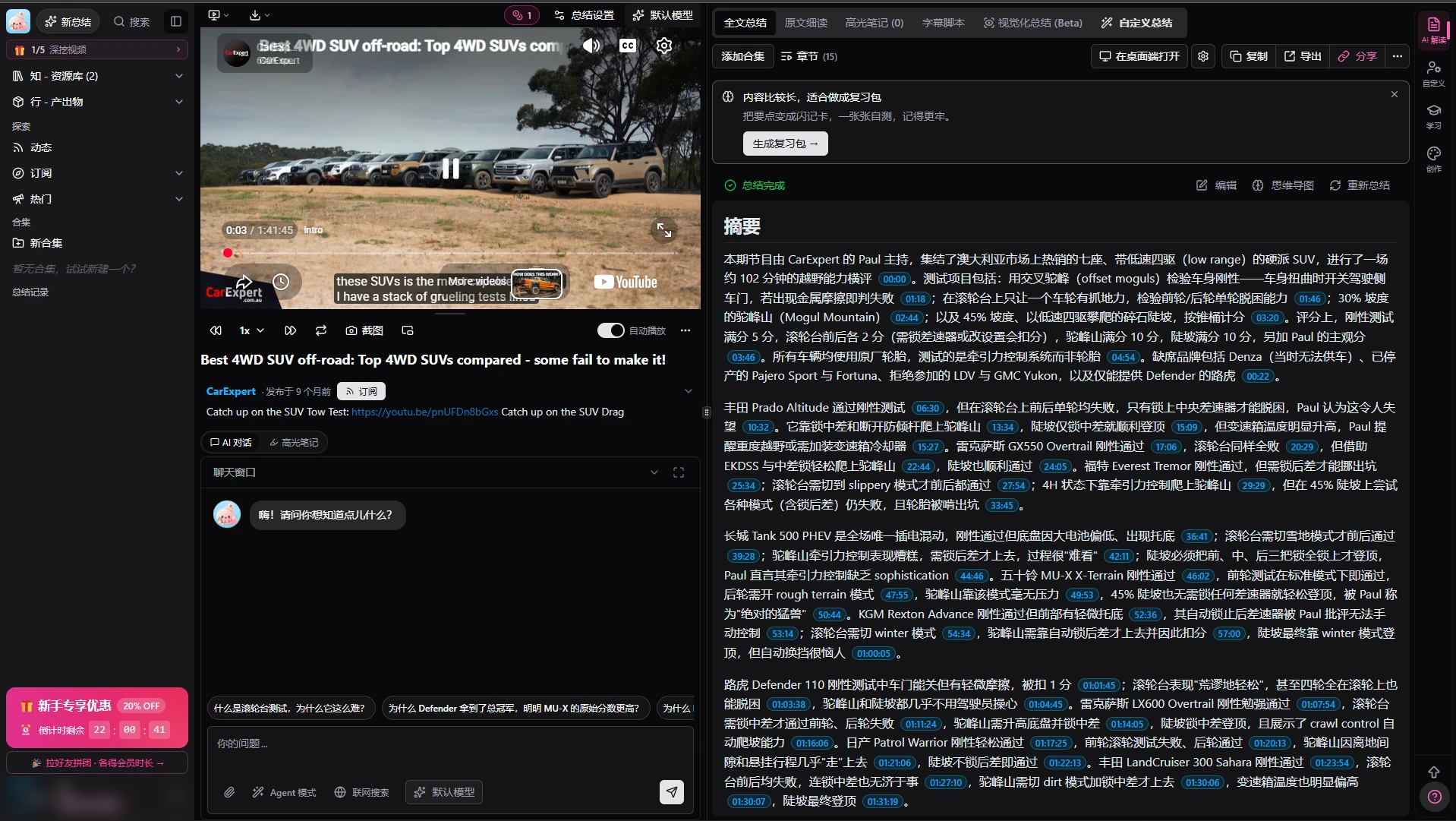
A 102-minute test of 4WD SUVs, in English. On bibigpt.co, everything came back in Chinese by default: the interface and the summary itself, even though the video is in English. (BibiGPT's international site, aitodo.co, has an English interface.) The summary is written as long, dense paragraphs with a timestamp after almost every clause, and no frames. BibiGPT's visual summary sits in a separate "Beta" tab.
Skryve's summary of the same video opens with a verdict table of the vehicles, then 11 sections and 39 points, with frames from the video on most of them.
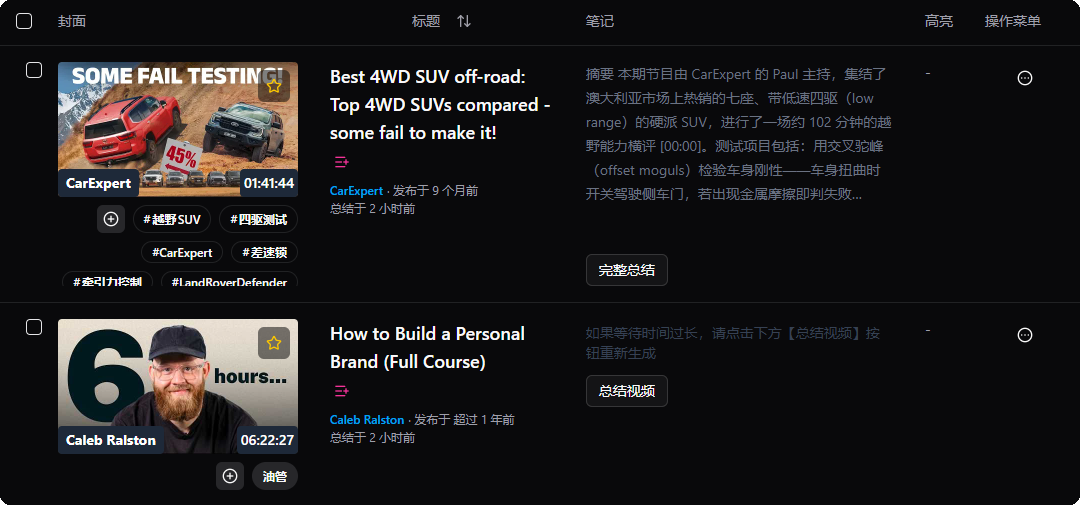
A six-hour course on personal branding. BibiGPT never produced a summary. Hours later, its history showed the video with no notes, only the line "if the wait is too long, click Summarize video below to regenerate". It gave no error and no reason. BibiGPT's plans cap a single video at 30 minutes on the free plan, 2 hours on Plus and 6 hours on Pro, so this 6-hour-22-minute course is over every plan's limit, but the app didn't say so.
Skryve summarised the same course into 32 sections and 175 points, with 21 slides, diagrams and worksheets from the video.
2. Frames in every summary, not a paid extra
BibiGPT can look at a video's frames, but as an add-on: you run its visual analysis separately, it picks around ten keyframes, and each run costs credits. Its normal summaries are built from the subtitles.
Skryve reads the frames as part of every summary. When something on screen matters, the frame appears next to the point it belongs to, with a timestamp that jumps back to that moment. Hover any frame to enlarge it. You don't have to decide in advance whether a video is "visual enough" to be worth paying for.
3. Next to the video, not in another app
BibiGPT is built around its own apps: you copy a link, paste it in, and read the summary there. Its Chrome extension mainly saves videos to a watch-later list for the app.
Skryve works where you're already watching. One click in Chrome's side panel summarises the video in front of you. The summary follows along as the video plays, clicking any point or frame moves the player, and your library is a click away in the same panel. There's no link to copy and no tab to switch to.
4. A library you can ask, without setting it up
BibiGPT's Collections let you chat across a playlist or a group of videos you've put together.
Skryve does this across everything you've watched, with no setup. Every video you summarise is saved to your library. One box does two jobs: type a few words to search all your videos, or ask a question ("how do people in my videos make a living?") and Skryve answers from the relevant passages of all of them, with numbered sources that jump to the exact moment. Ask it to draft a LinkedIn post or a blog post from your videos and it does the same.
5. Built-in video tools
Skryve also has tools BibiGPT doesn't list:
- A layout that fits the video: a verdict with pros and cons for a review, a table for a ranking, ingredients and steps for a recipe, each side's arguments for a debate.
- Key clips: the moments worth watching, as short clips you can play one after another or share.
- Comment analysis: up to 100 comments read for overall tone, the main emotions and the split of opinion, with quoted comments as evidence.
- Rumble: everything works on Rumble videos as well as YouTube.
6. What users report about BibiGPT
There's less independent feedback on BibiGPT in English than its popularity suggests; most of it is in Chinese, and much of what's online comparing it to other tools is written by BibiGPT or its competitors. Its Chrome extension has 2.4 stars from only 9 ratings, so treat these as reported experiences rather than proven trends:
- Price. Reviewers on Zhihu and in blogs praise the summaries but find it expensive for heavy use. Plus starts at $19.80 a month, extras like visual analysis use credits, and each plan caps how long a single video can be.
- Errors and lag. One Zhihu review says the video Q&A often returns errors. Chrome reviewers describe the extension as laggy, failing to log in, and doing nothing when clicked in some browsers.
- Platforms that don't always work. BibiGPT's homepage lists Douyin and Xiaohongshu, while its own FAQ says they're temporarily unsupported and suggests downloading and uploading instead. A reviewer reports a failed Xiaohongshu extraction.
- Hard to cancel. One Chrome reviewer describes cancelling the subscription as harder than building the plugin themselves.
- Breaking other pages. An older review says the extension broke Bilibili's navigation bar and other sites' backgrounds.
- Stability under load. BibiGPT says it introduced its monthly credit cap in 2026 because a few heavy accounts were making its servers unstable, and its FAQ covers site outages and top-ups that don't arrive.
To be fair to BibiGPT: reviewers consistently praise the quality and layout of its summaries, the breadth of platforms, and how quickly basic summaries come back.
7. Where BibiGPT is better
- Platforms. Bilibili, TikTok and Douyin, podcasts, online courses and local files, not just YouTube. Skryve covers YouTube and Rumble for now; web pages, PDFs and TikTok are on Skryve's roadmap.
- No captions needed. It transcribes the audio itself; Skryve needs captions (YouTube's automatic captions are enough).
- Study and writing formats. Mind maps, flashcards, slides and rewrites into articles or social posts.
- Everywhere. Web, macOS, Windows, iOS and Android apps, plus an API and MCP.
- Chinese-language content. It's built for Chinese platforms and audiences first.
8. Can you use both?
Yes. If you summarise podcasts, Bilibili or your own recordings, BibiGPT covers sources Skryve doesn't. Use Skryve for the YouTube and Rumble videos you watch to learn: the visual summary next to the video, the clips and comments, and a library you can ask across. When you want a video's notes elsewhere, export them from Skryve as Markdown, Word, HTML or PDF; the HTML and PDF versions keep the frames.
Skryve vs BibiGPT: which should you choose?
Choose BibiGPT if:
- you summarise many kinds of sources: Bilibili, TikTok, podcasts, courses, your own files;
- many of your videos have no captions;
- you want mind maps, flashcards or rewrites;
- you mostly watch Chinese-language content.
Choose Skryve if:
- most of what you learn comes from YouTube or Rumble videos;
- your videos show things on screen, and you want those frames in every summary without paying extra;
- you want the summary right next to the video, not in another app;
- you want key clips, comment analysis and a layout that fits the video;
- you want to search and ask across everything you've watched, with no setup.
The bottom line
BibiGPT is a broad, capable summarizer for almost any video or audio source, built around pasting links into its apps, with visual analysis as a paid extra.
Skryve does one thing in depth: it turns the YouTube and Rumble videos you watch into knowledge, from what's said and what's shown, right next to the video, and keeps it so you can ask about it later.
If video is a big part of how you learn, try the live demo without installing anything, or add Skryve to Chrome for free.
Skryve is an independent product and is not affiliated with BibiGPT. Product details and ratings checked on 17 November 2026; sources: BibiGPT pricing, BibiGPT docs: keyframe analysis, BibiGPT docs: Collections AI chat, BibiGPT FAQ, Chrome Web Store reviews.