YouTube has added a Gemini-powered Ask button below many videos. You can ask questions about the video you're watching, get explanations and request a quick summary without leaving the player.
It's a useful feature, particularly when you want a quick answer while watching something.
But there's a difference between asking questions about a video and actually extracting, organising and keeping everything useful inside it.
That's where Skryve takes a different approach.
Skryve is an AI video summarizer for YouTube and Rumble that reads both what's said and what's shown on screen. It writes structured summaries with the relevant video frames attached, picks out the key moments, and saves every video to a searchable personal library you can ask questions across.
In this comparison, we'll look at what each tool does, where they differ, and when Skryve is the better fit for learning, research or content creation.
This article covers the Ask button under a video. Google is also testing a separate "Ask YouTube" AI search that answers questions across YouTube as a whole; that is a different feature.
What is YouTube Ask?
YouTube Ask is an AI assistant built into the YouTube watch page. It lets you ask questions about a video, request explanations and get extra context without leaving the player.
For example, you could ask:
- What are the main arguments in this video?
- Explain the concept the speaker just mentioned.
- What are the key takeaways?
- Can you summarise the discussion?
Its answers can include timestamps you can click to jump to that part of the video.
Its biggest advantage is convenience. There's nothing to install: you open Ask and start typing.
It does have limits. According to Google's help page, Ask appears only on select videos, for signed-in users, and your Ask conversations are deleted automatically after 45 days. It is built for the moment you're watching, not for keeping and organising what you learn.
What is Skryve?
Skryve is an AI video summarizer and personal knowledge base for YouTube and Rumble that runs in Chrome's side panel, next to the video.
Most video summarizers work from the transcript alone. Skryve also reads the video's frames, because videos communicate through much more than speech.
A lecture might contain detailed diagrams. A product review might show a comparison table. A tutorial might demonstrate a whole process on screen. Important information can be shown without ever being fully said out loud.
Skryve captures that visual context and attaches the relevant frames to its summary, so you see the information next to the explanation.
Summarising is only one part of it. Every video you analyse is saved to your searchable library. You can ask questions across many videos, find the key clips, analyse the comments and export your notes.
The goal is to make video information something you can actually work with, rather than something you watch and eventually forget.
Skryve vs YouTube Ask: feature comparison
| Feature | Skryve | YouTube Ask |
|---|---|---|
| Ask questions about a video | Yes | Yes |
| Answers link to timestamps in the video | Yes | Yes |
| Summary of the video | Automatic, structured, with frames | On request, as a chat reply |
| Video frames shown inside the summary | Yes | No |
| Layout that fits the type of video (review, recipe, lecture, ranking) | Yes | No |
| Every video saved to a searchable library | Yes | No (conversations deleted after 45 days) |
| Ask questions across your own saved videos | Yes | No |
| Key moments picked as playable clips | Yes | No |
| Comment sentiment analysis | Yes | No |
| Export as Markdown, Word, HTML or PDF | Yes | No |
| Works on Rumble | Yes | No |
| Nothing to install | No (Chrome extension) | Yes |
Comparison of built-in features as of November 2026, not of what can be pieced together by copying text between apps.
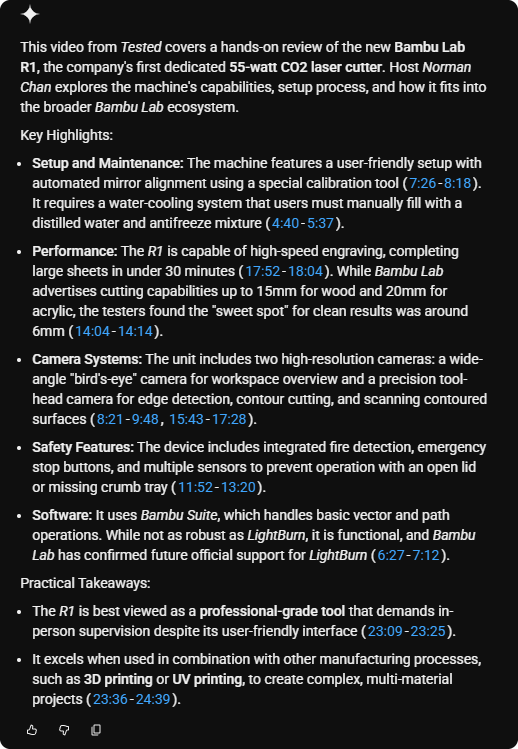
YouTube Ask
7 points · clickable timestamps · no frames
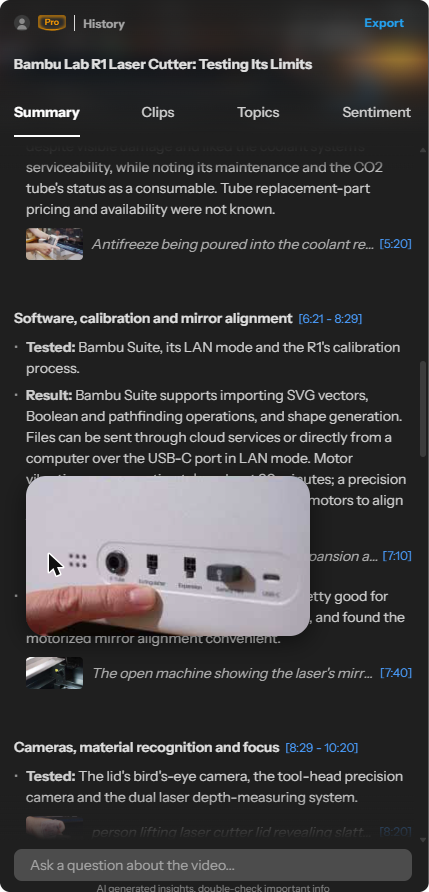
Skryve
38 points · clickable timestamps · 23 frames
1. Understanding the whole video, not just asking questions
YouTube Ask is useful when you have a specific question about a video.
But what if you don't know exactly what to ask?
Imagine a 50-minute lecture on artificial intelligence. You want the overall structure, the important concepts, the examples, and a way back to the most useful sections.
With YouTube Ask, you ask questions one by one and read the answers.
Skryve analyses the video and writes a structured summary of it, in a layout that fits the kind of video: a review becomes a verdict with pros and cons, a recipe becomes ingredients and steps, a ranking becomes a table, a lecture becomes structured notes.
Instead of having to guess every question in advance, you start with an overview you can explore further.
This is useful when:
- you're researching an unfamiliar topic;
- you're watching long educational videos;
- you're comparing several product reviews;
- you're collecting information from interviews;
- you're working through technical presentations.
You can then ask follow-up questions about the video itself, or search across your saved collection.
The difference in depth is easy to see. On a 25-minute laser-cutter review, YouTube Ask's "Summarize the video" button gave 7 points. Skryve's automatic summary of the same video gave 38: a verdict with pros, cons and alternatives, then 9 sections covering what was tested, the results and the reviewer's verdict on each, with 23 frames from the video.
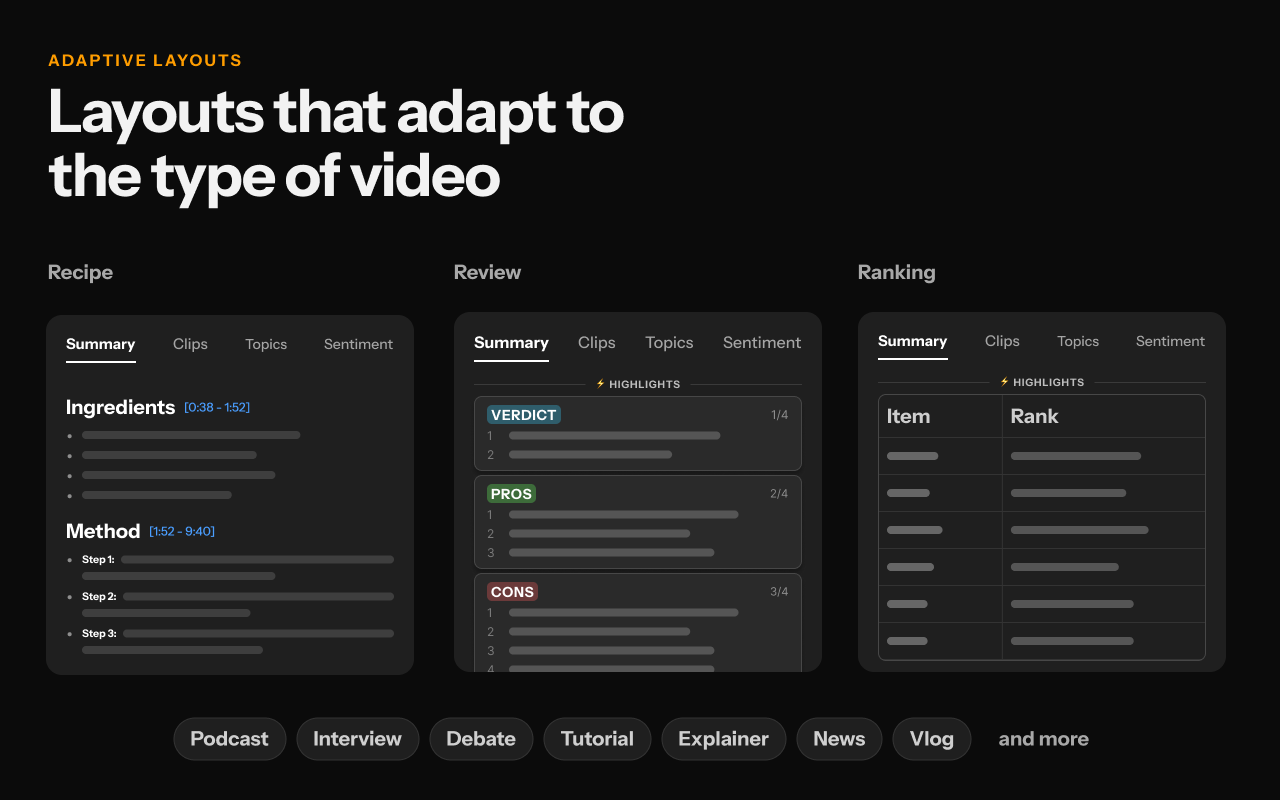
2. Video frames: the information transcripts miss
A video isn't just an audio recording with subtitles. What's on screen can matter as much as what's said.
Think of a financial analyst explaining revenue growth while a chart of quarterly figures is on screen, or a reviewer talking through a specification table. The words cover the explanation, but not necessarily the numbers shown.
The same applies to:
- lectures with slides;
- software tutorials with interface demonstrations;
- product reviews with specification tables;
- engineering videos with technical diagrams;
- cooking videos with visual instructions;
- business presentations with charts and data.
Skryve reads the video's frames alongside the transcript and places the relevant frames inside the summary, each with a timestamp that jumps back to that moment.
You don't just get a written account of what happened. You can see the visual material that supports it.
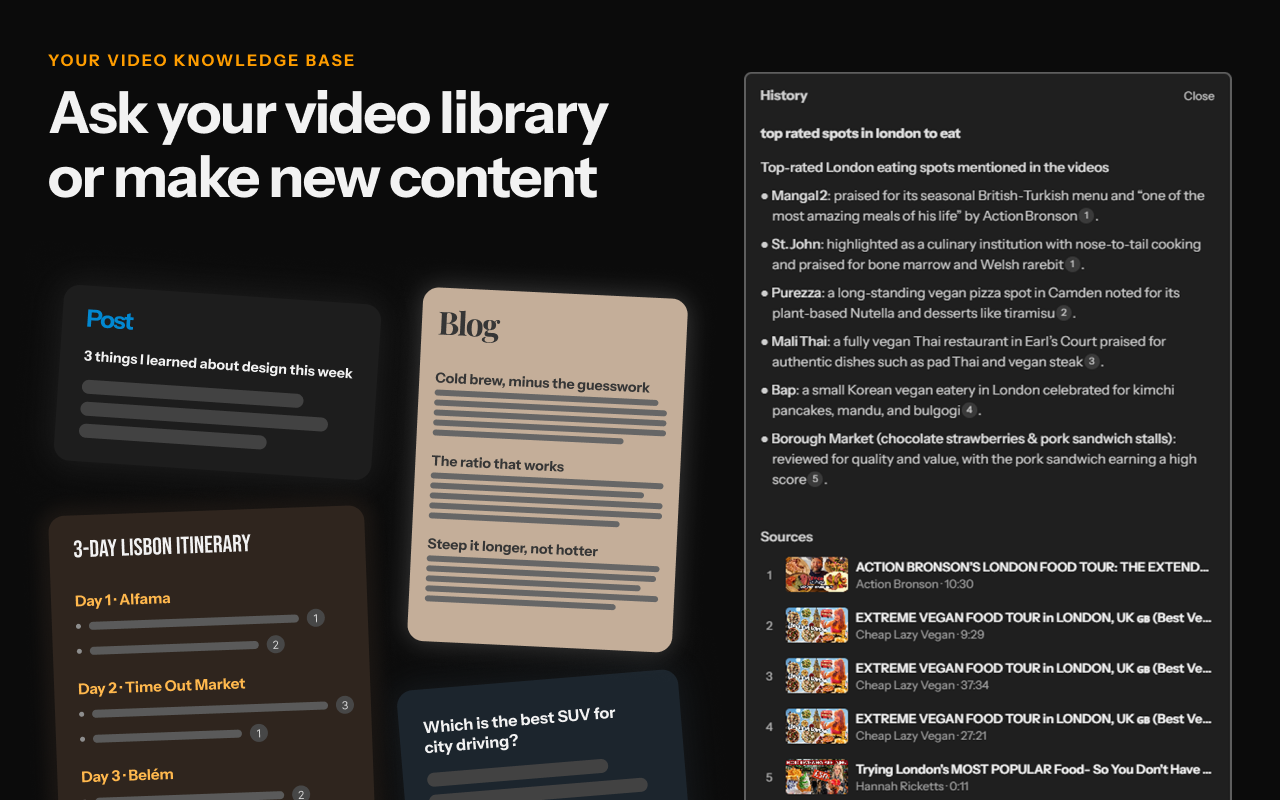
3. A personal library instead of disposable AI conversations
The usual problem with asking an AI while you watch is what happens afterwards.
You ask ten good questions, get some useful answers and close the tab. A few weeks later you remember something from that video but not which video it was. With YouTube Ask, the conversation is gone after 45 days.
Skryve saves every video you analyse, with its summary, to your personal library. Your research builds up over time.
You can search the library with keywords or plain questions and get answers that cite the source videos, without having to remember which video said what.
For example, imagine you've analysed 30 videos about electric vehicles: battery technology, reviews, charging infrastructure and industry interviews. You can ask:
- Which videos discussed solid-state batteries?
- Compare the range figures mentioned across my saved reviews.
- What were the recurring complaints about vehicle interiors?
- Find the discussions about charging infrastructure in rural areas.
Instead of revisiting every video, you query what you've already extracted. That's what turns Skryve from a summarizer into a personal video knowledge base.
4. Find the important moments without rewatching
Sometimes you don't need a full summary. You just want a particular moment.
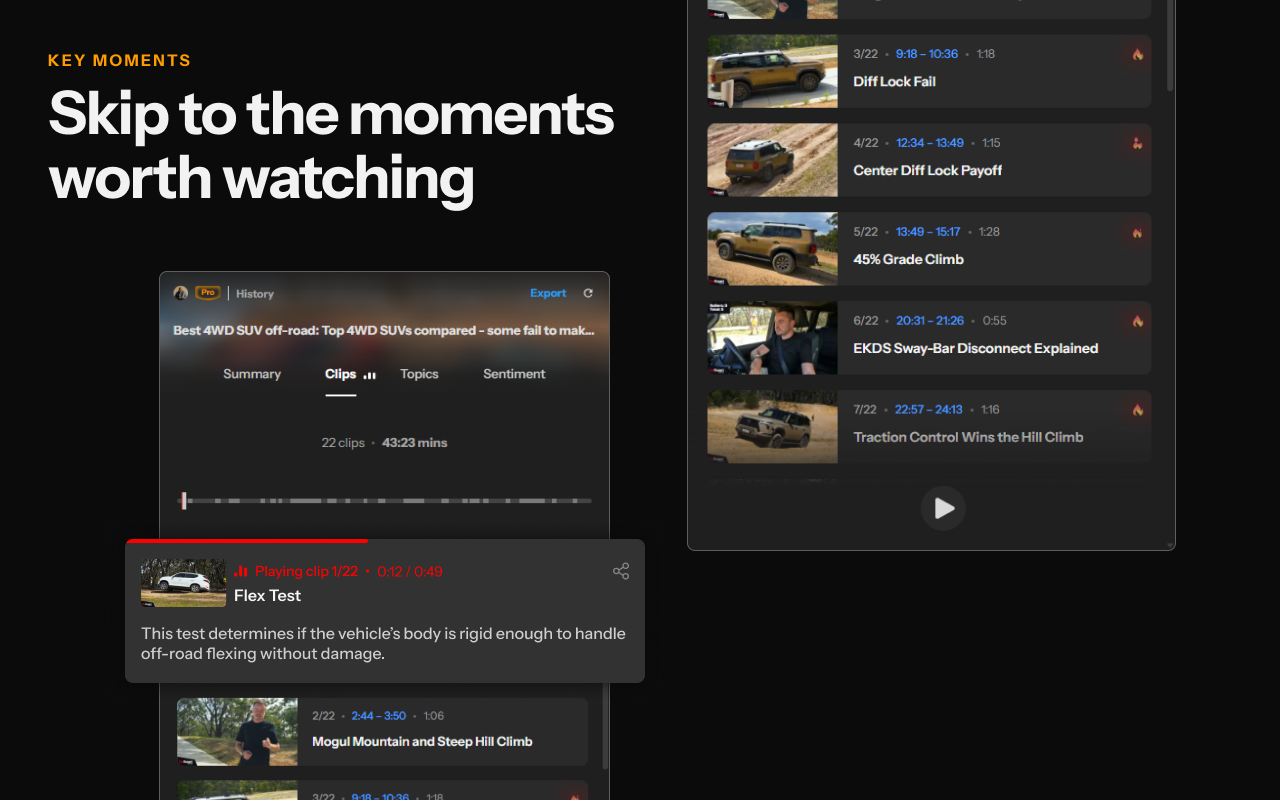
Skryve picks out the key moments and turns them into short, self-contained clips. You can browse them, see where each one sits in the video, play them one after another, and share a clip.
This is particularly useful for:
- long interviews and podcasts;
- educational lectures;
- product demonstrations;
- research discussions;
- creators looking for clips worth quoting.
YouTube Ask can answer questions about a video, but it doesn't offer a dedicated clip workflow like this.
5. Understand what people are saying in the comments
Comments are an often overlooked source of information. On reviews, tutorials and discussions they hold extra experiences, corrections, disagreements and questions.
Skryve analyses up to 100 comments and shows the overall tone, the main emotions and the split of opinion, with quoted comments as evidence.
If you're researching a product, you can look past the creator's opinion and see how viewers responded:
- common praise and complaints;
- recurring questions;
- where viewers disagree with the presenter;
- extra experiences shared by the audience.
This is especially useful for consumer research, market research and understanding audience reactions.
6. Turn video research into content
Once videos are in your library, you can ask Skryve to draft from them: a blog post, a social post, research notes, an outline, a comparison or study material, with the source videos cited.
You can also export a video's notes as Markdown (for Obsidian or Notion), Word, HTML or PDF, or copy them to the clipboard.
A researcher could analyse a set of interviews and pull out recurring themes for a report. A creator could gather points from several videos into an article.
Instead of rewatching and taking notes by hand, you start from a structured draft.
7. A few other differences worth mentioning
- Topics: search a video's full transcript for any word and jump straight to it.
- Chat with the video: ask questions about one video, with answers linked to the moment.
- Side panel: Skryve sits next to the video in Chrome, so you don't switch tabs.
- Two platforms: works on YouTube and Rumble.
8. Which one should you use?
Both are useful, but they're built for different jobs.
YouTube Ask makes sense if:
- you occasionally want a quick explanation;
- you have a specific question about the video you're watching;
- you don't need to save or organise what you learn;
- you'd rather not install anything.
Skryve makes sense if:
- you regularly learn from or research videos;
- you want a complete summary rather than individual answers;
- you watch videos with charts, slides, demonstrations and other visual information;
- you want a searchable library of everything you've watched;
- you need to compare information across several videos;
- you want the key clips and moments;
- you want to know what viewers think;
- you want to export and reuse what you extract.
More than an AI assistant for videos
Asking questions about a video and getting quick explanations is becoming a standard feature.
But a lot of what's in a video is lost once you've watched it. The details are spread across what's said, what's shown, the demonstrations and the comments.
Skryve brings those pieces together. It extracts what's said and shown, organises it into structured summaries with the frames attached, and makes everything searchable across a growing personal library.
YouTube Ask helps you interact with the video you're watching. Skryve helps you extract, keep and build on what you watch.
If you want a quick answer, YouTube Ask is convenient. If you want the videos you watch to become a searchable, reusable source of knowledge, give Skryve a try. You can try the live demo without installing anything, or add Skryve to Chrome for free.
Skryve is an independent product and is not affiliated with YouTube or Google. Product details checked in November 2026; sources: YouTube Help, Ask on the watch page.