WayinVideo (wayin.ai) is best known as an AI clipping tool for creators. It turns long videos into shorts, reframes them for vertical, adds captions and schedules them to social accounts. Alongside that it offers "video understanding": summaries, transcripts, mind maps, chat and a moment finder, in its web app and a YouTube extension.
Skryve is built for learning from video. It reads what's said and what's shown in YouTube and Rumble videos, keeps the summary next to the video in Chrome's side panel, and saves every video to a library you can search and ask questions across.
There's overlap, but the two are built for different people. Here's an honest comparison.
What is WayinVideo?
WayinVideo works on videos you import from YouTube and many other sites, or upload on paid plans. Its main tools are:
- AI clipping: finds highlight moments, gives each a "virality score", reframes to 9:16 and adds captions;
- Find Moments: describe a moment in plain words ("the part where they open the box") and it searches the video for it;
- Video notes: a summary, key moments, transcript, subtitles, a mind map and chat about the video;
- Publishing: scheduling clips to social accounts.
Its YouTube extension adds an "Understanding Video in Seconds" button to the player, which opens summary, key moments, subtitles, transcript, mind map and chat tabs on the YouTube page.
WayinVideo says its AI "truly watches the video, not just the transcript", and that it can summarise silent content like sport or dance. We found no independent test of that claim; the reviews we found tested speech-heavy videos.
Everything runs on credits: one credit is one minute of video, for notes, clipping and moment search alike.
What is Skryve?
Skryve is an AI video summarizer and personal knowledge base for YouTube and Rumble. It opens in Chrome's side panel, next to the video, and everything happens there.
It reads the transcript and samples the video's frames, so charts, slides, code, products and demos shown on screen appear in the summary with the frame attached. Every point links to its moment in the video. The summary takes a layout that fits the type of video (a review becomes a verdict with pros and cons, a recipe becomes steps, a ranking becomes a table), and Skryve picks out the key clips and analyses the comments.
Every video you summarise is saved to your library automatically. You can search it, ask questions across all your videos, or draft a post from them, with the source videos cited, without leaving the side panel.
Skryve vs WayinVideo: feature comparison
| Feature | Skryve | WayinVideo |
|---|---|---|
| Summarise YouTube videos | Yes | Yes |
| Rumble | Yes | Listed as an import source |
| Other sites and uploads | Not yet (web pages, PDFs and TikTok are on the roadmap) | Many video sites; uploads on paid plans |
| Uses what's shown on screen | Yes, frames shown in the summary | Claims to watch the video; no frames in the summary |
| Clickable timestamps | Yes | Yes |
| Where it appears | Chrome's side panel, next to the video | Web app, or a panel opened from a button in the YouTube player |
| Layout that fits the type of video | Yes | No (same notes format) |
| Key moments | Picked as playable clips | Moments tab (6 moments, about 10 of 59 minutes, in our test); clips to export with a virality score |
| Find a moment by describing it | Ask the video a question | Find Moments |
| Export clips as vertical shorts with captions | No | Yes |
| Comment sentiment analysis | Yes | No |
| Every video saved to a searchable library | Yes | No (one video at a time; free-plan projects expire after 3 days) |
| Ask questions across all your videos | Yes | No (chat is per video) |
| Mind map | No | Yes |
| Export notes | Markdown, Word, HTML, PDF | TXT, Markdown, subtitle files |
| Free plan | 200 free credits to start | 100 credits at sign-up, plus 30 a day for notes |
| Paid plan | Pro, $8 a month | Starter $15.99 a month, Pro $26.99, Scale $139.99 (lower if billed yearly) |
Built-in features as of November 2026, from WayinVideo's pricing page, tool pages, help centre and terms.
1. We tried both on the same video
We ran WayinVideo and Skryve on the same 59-minute history video in November 2026.
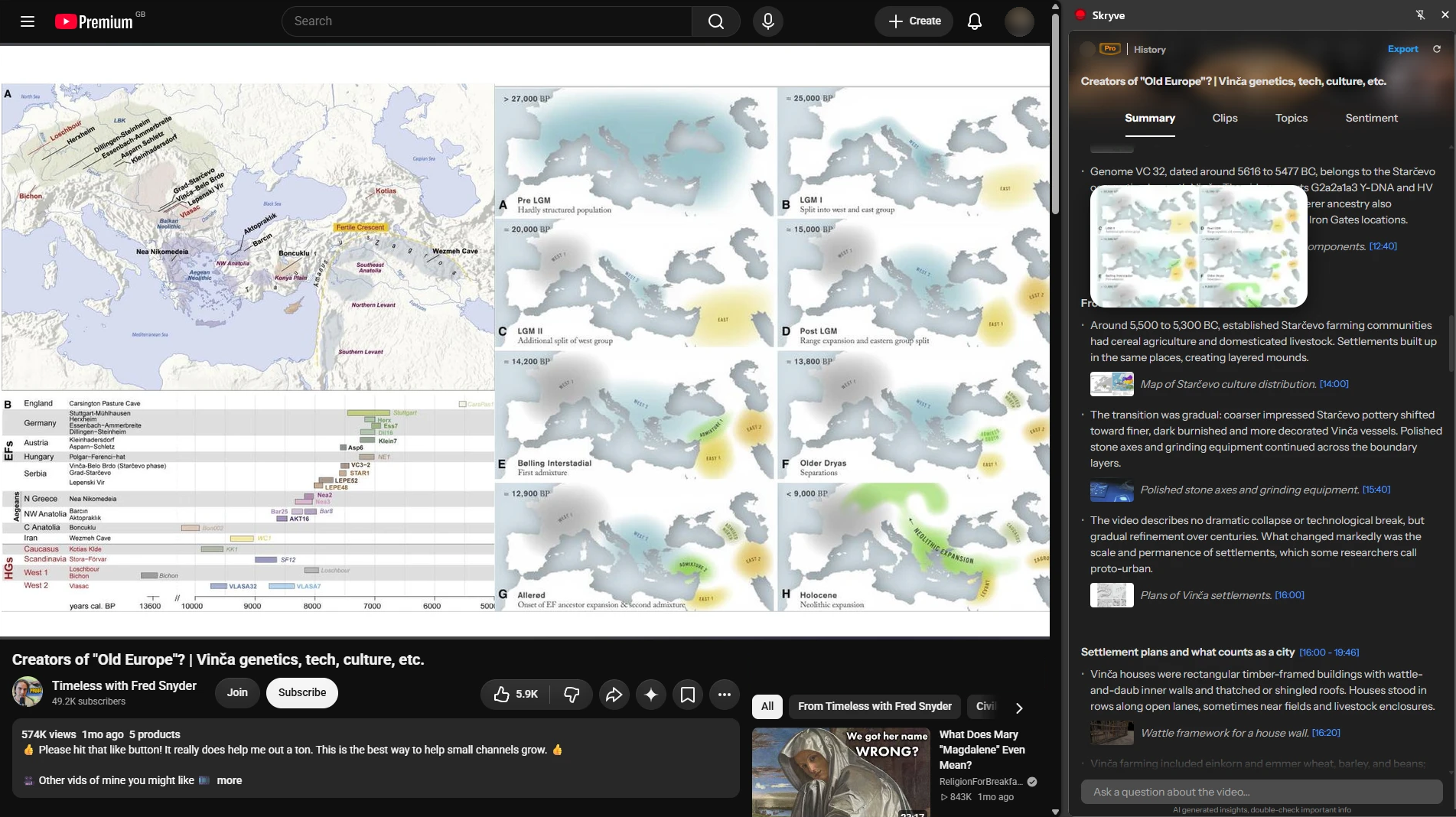
The notes. WayinVideo's Smart Summary was good: a clear structure, an overview, about 40 points across a dozen topics, each with a clickable timestamp. What it doesn't include is anything from the screen: no frames, even though the video is full of maps, artefacts and diagrams. Skryve's summary of the same video has 18 sections and 54 points, with a frame next to most of them and a caption saying what it shows, like "Map of Starčevo culture distribution".
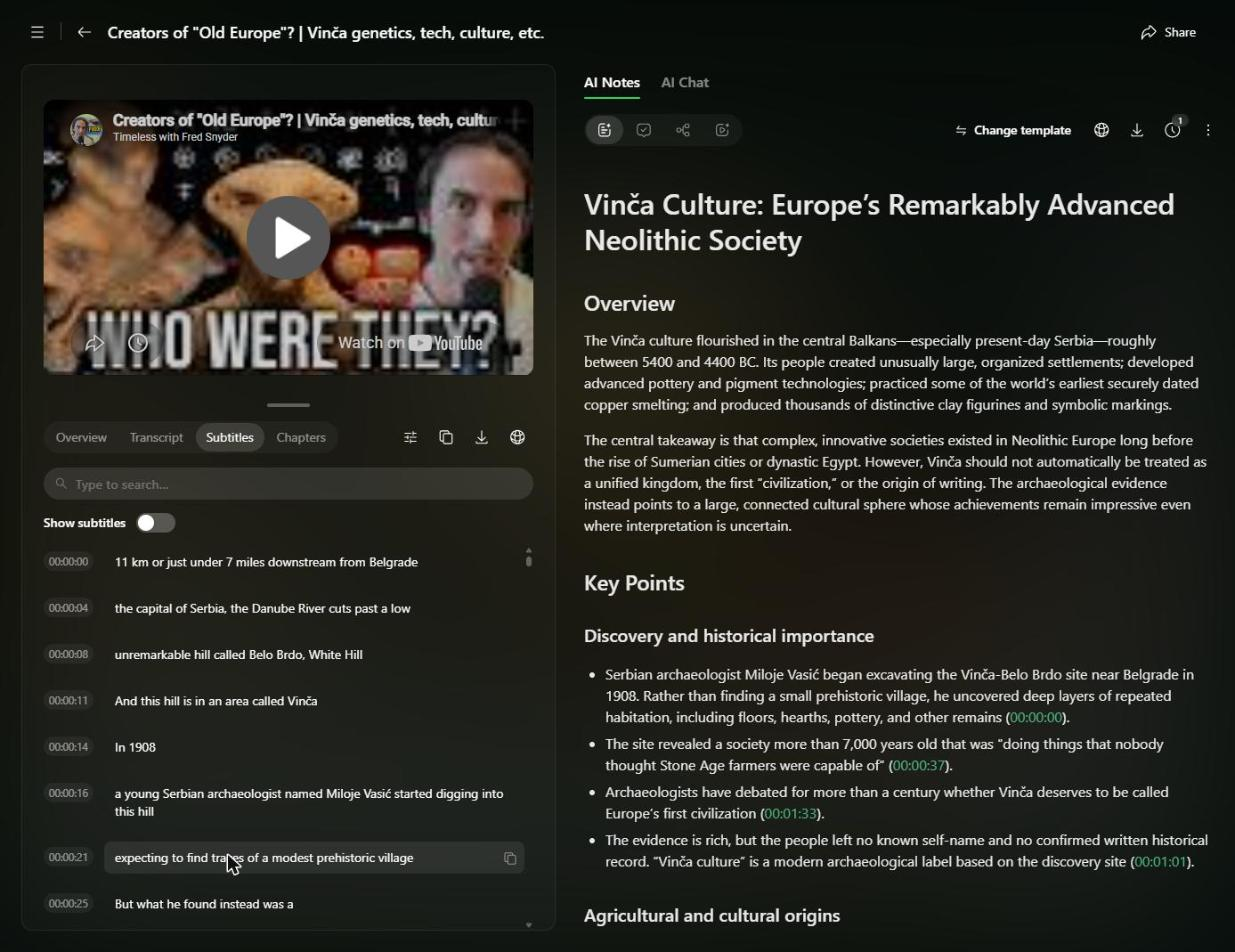
The moments. WayinVideo's Moments tab is where frames appear. It picked 6 moments, about 10 minutes of the 59, and skipped two long stretches: nothing between 9:23 and 28:35, and nothing between 40:43 and 55:20. Each moment is a few quoted lines from the transcript with a thumbnail beside them; nothing in the text says what the picture shows or why it's there.
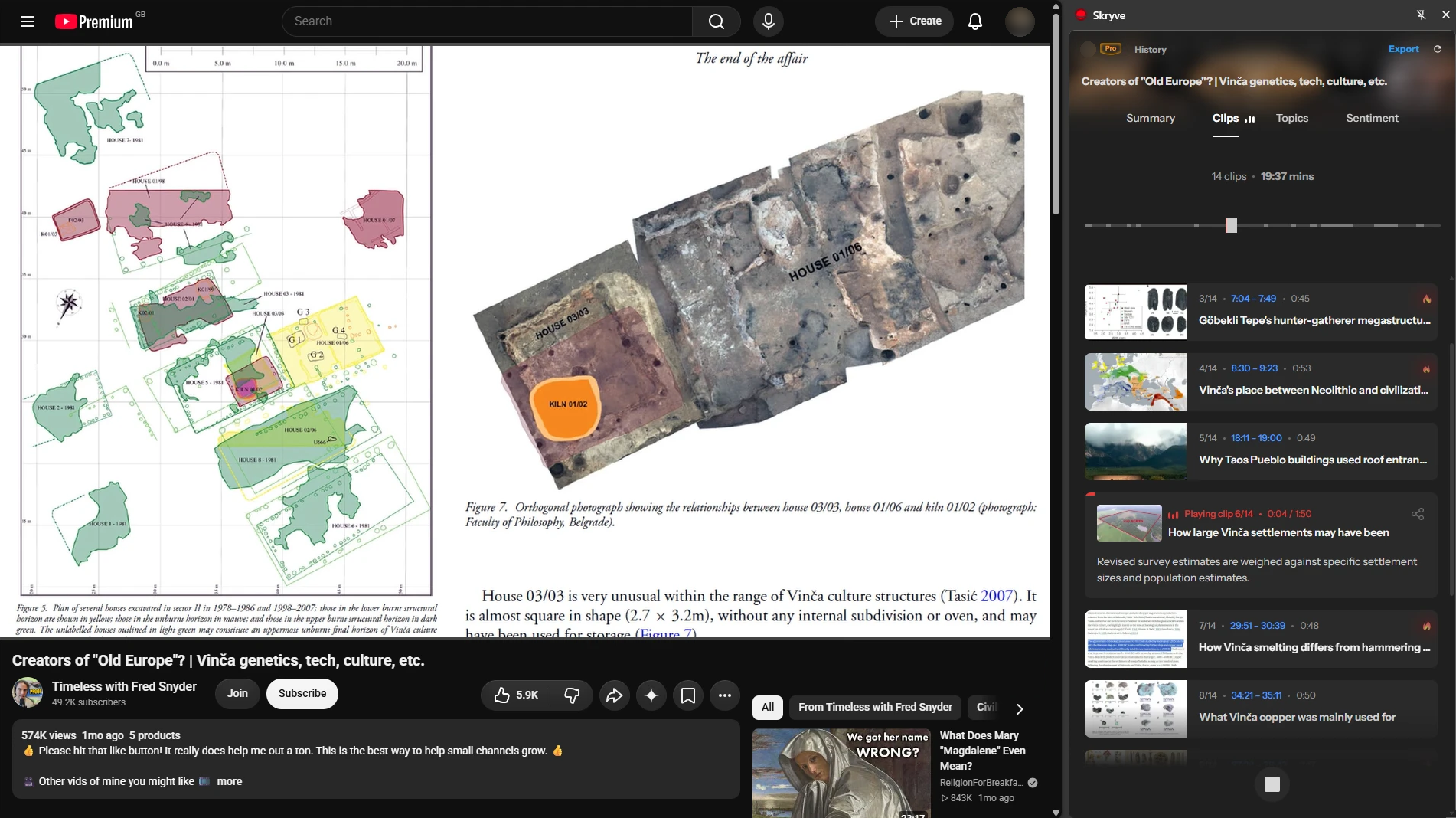
Skryve's Clips tab picked 14 clips, about 20 minutes in all, each with a title saying what it covers. You can play them one after another, like a short version of the video.
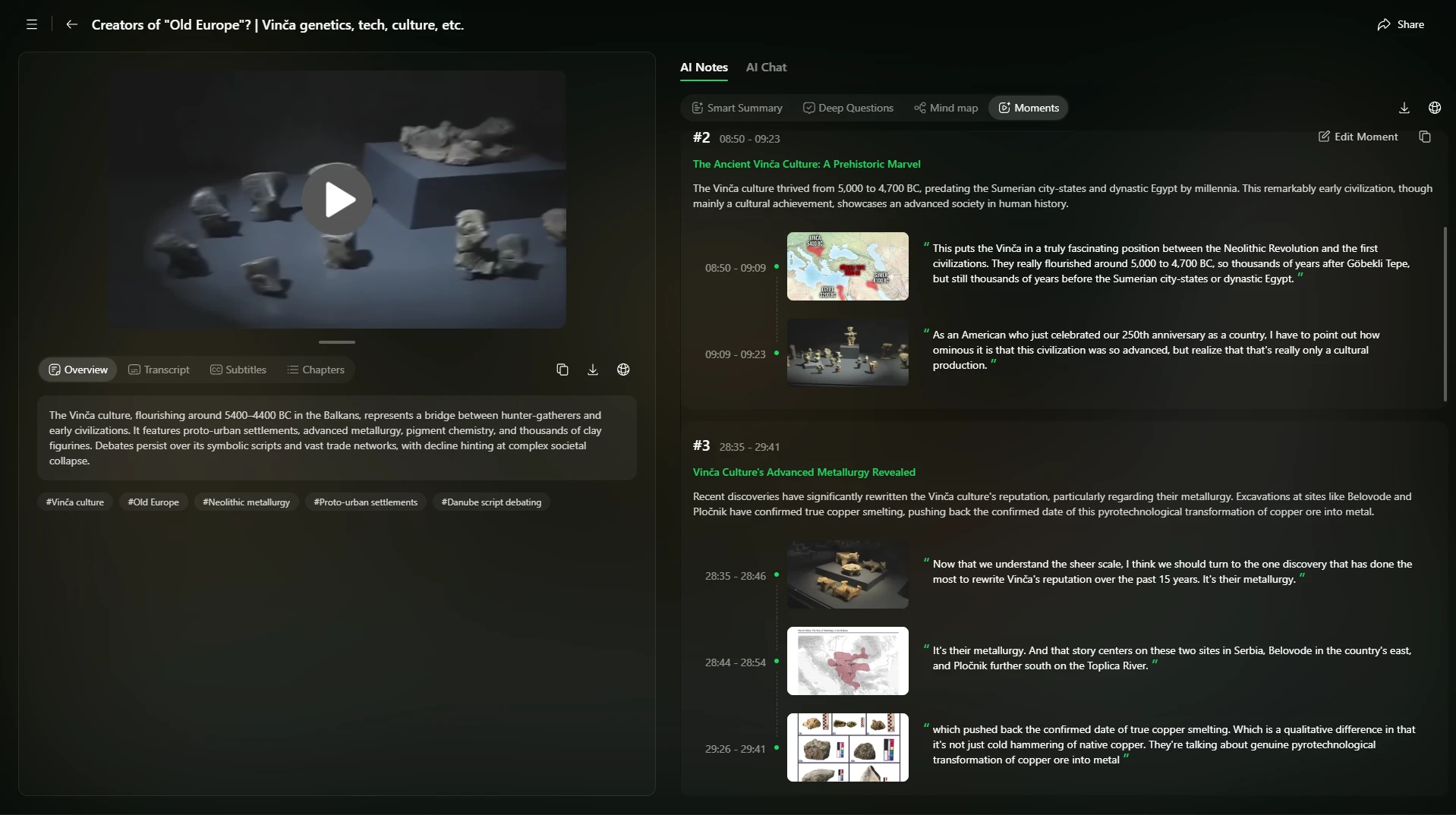
Look closely at what each moment holds: a thumbnail and a quoted line from the transcript. The picture isn't summarised or described, and the quote doesn't mention it. It's a snippet of the transcript with a still from that second.
In Skryve, frames are part of the summary itself. Each one sits under the point it supports, with a caption saying what it shows, like "Plans of Vinča settlements" or "Polished stone axes and grinding equipment".
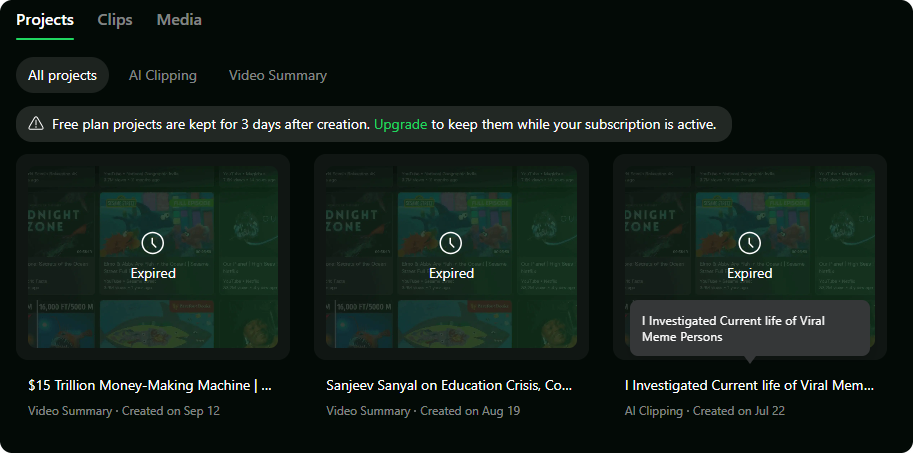
Your history disappears. On WayinVideo's free plan, projects are deleted three days after they're created; our earlier summaries showed only "Expired". In Skryve, every video you summarise stays in your library.
2. Built for clipping vs built for learning
WayinVideo's strongest features are for people who make content from video: cutting highlights, reframing them for TikTok and Reels, adding captions and scheduling posts. Its summaries and notes sit alongside that.
Skryve is built for people who learn from video: students, researchers, professionals and curious watchers. Everything is aimed at understanding a video and keeping what's in it: a structured summary in a layout that fits the video, frames for what was shown, key clips to rewatch, what the comments say, and a library of everything you've watched.
If you want to post clips, WayinVideo is the better fit. If you want to learn from what you watch and find it again later, Skryve is.
3. Frames you can see, not a claim
WayinVideo markets "multimodal AI" that watches the video. That may well help it understand what's happening, but its notes don't show you what it saw: you get text. The thumbnails in its Moments tab sit beside quoted lines from the transcript, with nothing saying what's in them.
Skryve shows its work. When something on screen matters, the frame appears in the summary next to the point it belongs to, with a timestamp that jumps back to that moment. Hover any frame to enlarge it. If the summary says the reviewer showed a spec table, the table is right there.
4. A library you can ask, not one video at a time
WayinVideo handles one video per task. Its chat answers questions about the video in front of you, and we found no way to search or ask across all the videos you've processed.
Skryve keeps every video you summarise in a library in the side panel. One box does two jobs: type a few words to search everything you've watched, or ask a question ("how do people in my videos make a living?") and Skryve answers from the relevant passages of all your videos, with numbered sources that jump to the exact moment. Ask it to draft a LinkedIn post or a blog post from your videos and it does the same.
5. Next to the video, every time
WayinVideo's extension opens its notes from a button inside the YouTube player, and its full features live in a separate web app.
Skryve opens in Chrome's side panel, beside the video. The summary follows along as the video plays, clicking any point or frame moves the player, and your library is a click away in the same panel.
6. What users report about WayinVideo
WayinVideo has a small public review footprint: 3.0 stars from 7 reviews on Trustpilot, around 4.5 from 48 ratings for its extension, and a 5.0 rating on G2. The complaints that come up:
- Free trials that need a paid plan. Three of the seven Trustpilot reviewers say features they signed up to try, like clipping an uploaded file or free clip minutes, then asked for payment. Uploading your own files isn't included in the free plan.
- Credits that run out fast. One reviewer paid for a year of credits and says prompts returned "random clips" while the credits disappeared. Independent reviewers also warn that credits go quickly, since every minute of video costs a credit, and unused credits don't roll over to the next month.
- Account and support problems. One user couldn't delete their account because the verification code never arrived; another's scheduled posts stopped publishing until support fixed it. On Trustpilot, the company hadn't replied to the negative reviews.
- A pop-up over the video. An extension reviewer reports a pop-up that blocks the video and can't be closed.
- Accuracy limits. Reviewers found moment search sometimes returns near misses, and transcription is weaker with accents, jargon or background noise.
To be fair to WayinVideo: users consistently praise its speed (long videos summarised in seconds), its timestamp navigation, the mind map, and its clipping for gaming and social content.
7. Where WayinVideo is better
- Making clips. Highlight detection, a virality score, vertical reframing, captions and scheduling: a full workflow for posting shorts. Skryve finds the key clips for you to watch and share, but doesn't produce vertical shorts.
- More sources. Imports from many video sites, and uploads of your own files on paid plans.
- Find Moments. Searching a video by describing a scene, an action or a sound.
- Mind maps of a video's structure.
- More languages and formats for subtitles and transcripts, including SRT and VTT files.
8. Can you use both?
Yes, if you do both jobs. Use WayinVideo to cut and post clips, and Skryve to understand and keep what's in the videos you learn from: the visual summary next to the video, the comments, and a library you can ask across. When you want a video's notes elsewhere, export them from Skryve as Markdown, Word, HTML or PDF; the HTML and PDF versions keep the frames.
Skryve vs WayinVideo: which should you choose?
Choose WayinVideo if:
- you're a creator turning long videos into shorts for TikTok, Reels or YouTube Shorts;
- you need vertical reframing, captions and scheduling;
- you work with uploads or many different video sites.
Choose Skryve if:
- you watch YouTube or Rumble videos to learn, research or keep up;
- you want to see the frames behind each point, not just text;
- you want the summary right next to the video, in a layout that fits it;
- you want a library of everything you've watched that you can search, ask and draft from;
The bottom line
WayinVideo is a capable clipping platform with video notes attached, priced and designed around creators and per-minute credits.
Skryve does one thing in depth: it turns the videos you watch into knowledge, from what's said and what's shown, right next to the video, and keeps it so you can ask about it later.
If video is a big part of how you learn, try the live demo without installing anything, or add Skryve to Chrome for free.
Skryve is an independent product and is not affiliated with WayinVideo or Wayin. Product details and ratings checked on 17 November 2026; sources: WayinVideo pricing, WayinVideo video summarizer, Find Moments, WayinVideo help: how credits work, Trustpilot reviews.